
FourKites CarrierLink App
FourKites, Inc.Maps & Navigation
4.82.06K Reviews
- Version
- 6.7.28
- Installs
- 500.00K
- Age Rating
- Everyone
Screenshots
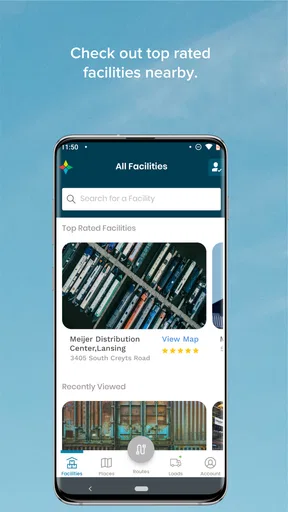
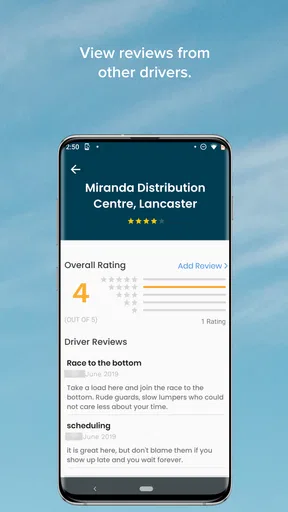
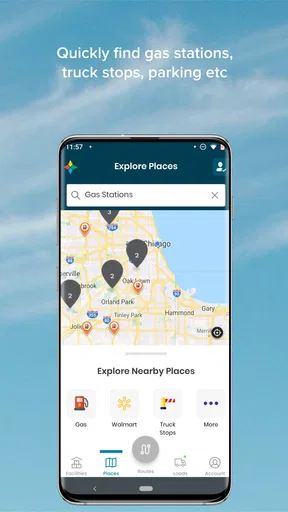
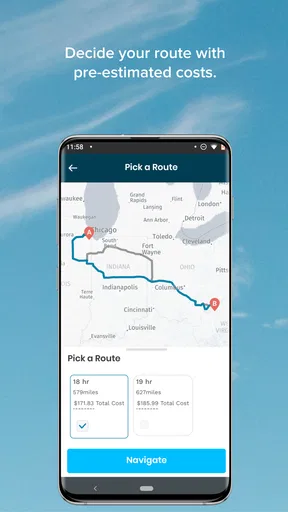
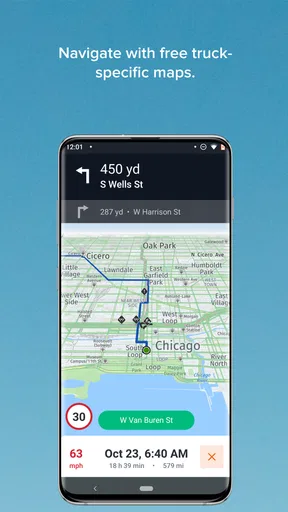
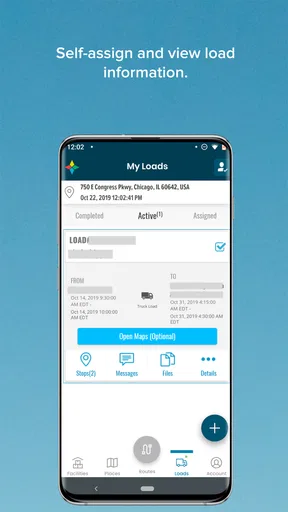
Our Review of FourKites CarrierLink App
 Analysis by Appyee
When I look at FourKites CarrierLink, I see a focused tool rather than a general navigation app. It is built for truck drivers who need to keep an assigned load visible to the people coordinating it. That distinction matters before you install it: this is not the app I would choose for finding a scenic route, checking traffic on a family trip, or replacing a full-featured road atlas. Its value is tied to freight work, assigned loads, and smoother communication around a shipment.
I approached it as a driver deciding whether another work app deserves space on a phone already crowded with navigation, messaging, fuel, and compliance tools. My conclusion is favorable, but conditional. If your carrier or logistics workflow uses FourKites, the app can remove a repetitive tracking task from your day. If nobody has assigned you loads through that ecosystem, there is little reason to adopt it independently.
What I would consider before installing it
I’d first check whether my carrier actually assigns loads through FourKites, because that determines whether this app will become a useful part of my routine or just another icon. I’d also clarify when tracking should be active and whom to contact if a load does not appear. With that practical setup in mind, I’d then judge whether its value holds up beyond the first trip.
The first question is whether your work already uses FourKites
The most important decision criterion is not the camera, the phone model, or the size of the download. It is whether your dispatcher, carrier, or customer expects shipment visibility through FourKites. CarrierLink is designed around that relationship. The app’s purpose is to let a truck driver enable seamless tracking for assigned loads, so its usefulness begins when there is an actual load and a connected workflow behind it.
That makes the app unusually practical for the right person and almost irrelevant for the wrong one. I would not install it simply because I wanted a new navigation option. I would install it after receiving clear instructions from the company handling my freight, ideally with the load already associated with my account. In that situation, the app has a defined job instead of becoming another isolated utility.
Think about the difference between navigation and shipment visibility
Drivers often group every road-related app together, but the jobs are different. A navigation app helps me decide where to drive. A shipment-tracking app helps authorized people understand where an assigned load is moving. CarrierLink belongs to the second group. It may sit beside a navigation app rather than replace one.
This separation is useful in daily work. I can use the navigation tool I already trust for route decisions while using CarrierLink for the tracking obligation connected to the freight. That avoids expecting one app to do two unrelated jobs. It also explains why someone looking for turn-by-turn directions may feel disappointed even if the tracking experience itself is straightforward.
Compatibility is broad, but the work context still matters
The app is free, carries an Everyone content rating, and runs on Android seven or later. Those details make it approachable for drivers using an older supported phone, but compatibility alone does not guarantee a useful setup. The account, assigned load, and instructions from the carrier remain more important than simply being able to install it.
I would also prepare the phone before a trip rather than trying to configure everything while parked at a busy pickup location. Sign in, check that the correct work identity is being used, and confirm that the assigned load appears as expected. That small preparation step can prevent the common mistake of assuming the app is active when the operational workflow has not actually been connected.
Decide how much tracking responsibility you are comfortable carrying
Any app used for ongoing load visibility deserves a little thought about phone habits. A driver should know when tracking is expected, whether the app needs to remain available during a trip, and what to do if the phone battery becomes low or connectivity changes. I would ask the dispatcher these questions before departure rather than guessing.
This is not a criticism of CarrierLink specifically; it is a practical consequence of using a phone as part of a freight process. A driver who treats the app as a one-time check-in may not get the same result as a driver who follows the carrier’s tracking instructions carefully. The best experience comes from understanding the workflow, not from tapping through the installation and forgetting about it.
Where CarrierLink is strongest in real work
The clearest strength is reducing manual updates. Without a connected tracking tool, a driver or office team may need to exchange repeated location messages, status calls, or arrival confirmations. When CarrierLink is properly tied to an assigned load, that information can move through the intended channel with less interruption.
I find that especially valuable during a long day with several handoffs. A driver may be focused on safe driving, a gate appointment, paperwork, or finding a legal place to stop. Repeating the same location update is not difficult, but it is easy to postpone. A dedicated tracking workflow gives the shipment team a better chance of seeing progress without turning every update into another conversation.
A realistic day behind the wheel
Imagine I collect a loaded trailer early in the morning and receive instructions to use CarrierLink for that shipment. Before leaving, I open the app, check that the assigned load is the one I expect, and make sure the phone is charged. I then keep my normal navigation app open for the route while CarrierLink handles the separate visibility task.
At the first stop, the office already has a clearer idea that the truck is progressing, so I spend less time composing a location message while managing the appointment. Later, if traffic or a facility delay changes the schedule, I still follow the carrier’s process for exceptions; I do not assume that automated visibility explains every operational problem. The app helps with the baseline picture, while human communication remains important when something unusual happens.
That is the practical boundary I appreciate. CarrierLink can reduce routine status friction, but it is not a substitute for calling when a load is damaged, a delivery window is at risk, or instructions change. Treating it as a visibility layer rather than a complete dispatch system leads to more realistic expectations.
Useful habits that are easy to overlook
My first tip is to verify the load before moving. A tracking app is only helpful if the correct assignment is connected to the correct driver. Checking that detail while parked is safer and easier than troubleshooting after departure. If the load is missing or looks wrong, the dispatcher is the right person to contact rather than repeatedly reinstalling the app.
My second tip is to separate routine tracking from exception reporting. Let the app support ordinary movement, but keep the carrier’s preferred contact method ready for delays, detours, breakdowns, or appointment changes. This two-channel approach prevents a driver from assuming that a location signal communicates the reason behind a delay.
My third tip is to protect the phone’s role in the workflow. Keep it charged, avoid changing work accounts mid-trip, and do not close or alter anything during a maneuver just to check status. The best tracking tool is still secondary to safe driving. These habits sound simple, but they are more valuable than trying to force the app to replace every other tool on the phone.
What the app does not replace
I would not use CarrierLink as my only route planner. A dedicated navigation app is usually the better choice for turn restrictions, road preferences, live traffic decisions, and the visual guidance needed while driving. CarrierLink’s role is narrower, and that narrowness is part of its design rather than automatically a weakness.
I also would not treat it as a complete communication platform. A dispatcher may still need to send instructions, confirm appointments, or discuss a problem directly. Nor would I expect it to replace a carrier’s paperwork process or every internal status procedure. The app can support those systems, but the exact division of responsibilities depends on how the freight operation has configured its workflow.
Where familiar alternatives may fit better
The usual alternatives fall into different categories. A standard navigation app is better for a driver who mainly wants directions and traffic awareness. A phone call or messaging service may be more appropriate when the main need is explaining a delay or negotiating a change. A carrier-specific portal may be preferable when a company already has its own established check-in process.
CarrierLink is the better fit when the central problem is reliable visibility for assigned loads within the FourKites environment. It has a clear advantage over improvised text updates because it is purpose-built for that tracking relationship. However, it does not automatically beat a carrier’s existing system simply because it is dedicated. If your employer has trained everyone on another platform and customers already receive updates there, switching may create more confusion than value.
For independent drivers who work across many unrelated brokers, the decision is more nuanced. One tracking app may be useful for a particular load while offering little benefit for the rest of the day. In that case, I would follow the requirements of each connected shipment instead of assuming one app should become the center of all operations.
The trade-off between simplicity and control
CarrierLink’s focused purpose can make it easier to understand than a large logistics suite. I do not need to search through unrelated planning features to find the tracking task. That simplicity is attractive when I am trying to complete a required work step quickly.
The trade-off is that a focused app may not give me the broad control I expect from a full dispatch or fleet-management platform. Drivers who want one dashboard for routes, documents, fuel planning, messages, and every shipment may prefer a more comprehensive system. CarrierLink makes more sense when the company has already assigned it one specific responsibility and does not expect it to become the driver’s entire operating console.
What switching really costs
Because the app is free, the financial barrier is low. The bigger cost is procedural. I would need to learn when to activate tracking, understand which loads appear, keep the correct account connected, and know who to contact when something fails. Those steps are manageable, but they are still part of adopting any tool that affects shipment visibility.
There is also a coordination cost for the carrier. If drivers use several methods inconsistently, the office may receive duplicate updates or wonder which source is current. For that reason, I would not switch on my own halfway through a busy operation. I would adopt CarrierLink as part of a clear instruction from the company or customer, then use it consistently for the loads covered by that process.
Moving away from it can have a similar cost. If a carrier depends on its tracking connection, replacing the app with occasional messages may make status less predictable for everyone else. On the other hand, keeping it installed when no assigned loads use the system adds clutter without delivering much value. The sensible choice is to match the tool to the freight workflow rather than treating installation as a permanent commitment.
How established usage affects confidence
CarrierLink has been available since August twelfth, two thousand fifteen, and its current release is version six point seven point twenty-eight. On the store, it holds a four point eight average from around thirty-three thousand ratings, with more than two thousand written reviews and over five hundred thousand installs. Those figures suggest that the app has found a substantial audience, but they should be read in context: broad adoption does not guarantee that it fits every carrier’s process.
For me, the more meaningful signal is whether the people responsible for my assigned loads actively support it. A high average can reassure me that the product is established, while the operational instructions determine whether it will work for my particular trip. I would value both, but I would not confuse popularity with compatibility with my employer’s systems.
Small points that can make the experience smoother
I would begin setup while stationary, preferably before the pickup appointment becomes urgent. I would also keep the app updated through the normal store process when practical, especially if the carrier tells me that a particular release is required. Since the developer is FourKites, Inc., support questions are best routed through the carrier’s designated process first, because the issue may involve the load assignment rather than the phone application itself.
If the phone is shared between personal and work use, I would be especially careful about selecting the right account and checking the active assignment. A driver can have a perfectly functional installation and still create confusion by using the wrong work identity. That is one of the less obvious risks of any assignment-based tracking tool: the failure may be administrative rather than technical.
Who should use it, and who should skip it
I recommend it to truck drivers whose assigned loads are managed through FourKites and who want a dedicated way to support shipment visibility without sending repeated manual updates. It is also a reasonable choice for carriers that need drivers to participate in a consistent tracking process and can provide clear instructions for activation and exceptions.
I would skip it if I am a casual driver, a commuter, or someone looking for ordinary maps and navigation. I would also hesitate if my carrier does not use FourKites, if no loads appear under my account, or if the company has a different tracking method that everyone already follows. Installing a specialized tool without an operational reason only adds another icon and another process to remember.
My recommendation after weighing the alternatives
CarrierLink is worth installing when it is part of the load you have been assigned, not as a general-purpose driving app. That is the clearest way I can put it. Its strength is focused shipment tracking, and its usefulness grows when the carrier, dispatcher, and driver all understand the same workflow.
I like the app because it addresses a real annoyance in freight work: routine visibility can otherwise depend on repeated messages and calls. I also respect its limits. It does not remove the need for navigation, direct communication, safe phone habits, or a carrier’s own procedures. Drivers who expect one app to handle every part of a trip should choose a broader logistics solution instead.
For the right user, the free price and Everyone rating make trying it easy, and the established release history and user response provide some reassurance. My practical advice is to install it only after confirming that your next assigned load uses the FourKites workflow, configure it before departure, verify the assignment while parked, and keep a direct contact method available for anything the tracking view cannot explain. Used that way, it feels less like extra software and more like a quiet work tool doing one job well.
Verdict
Strengths of FourKites CarrierLink App
- Real-time shipment visibility helps carriers track loads and delivery progress.
- Quick access to appointment details supports better route and schedule planning.
- Digital status updates reduce repeated calls and manual check-ins.
- Useful for coordinating drivers, dispatchers, and warehouse teams.
- Clear shipment information can help identify delays earlier.
Limitations of FourKites CarrierLink App
- Requires reliable mobile data or Wi-Fi for timely updates.
- Some features may depend on shipper participation and data accuracy.
- Frequent notifications can become distracting during busy routes.
- The interface may take time for new drivers to learn.
- Battery usage may increase when location services stay enabled.
Similar Picks in This Category
View All
Uber - Request a ride
Uber Technologies, Inc.4.7


inDrive. Rides with fair fares
® SUOL INNOVATIONS LTD4.8

Yandex Go: Taxi Food Delivery
Mikromobilnost LLC Belgrade4.8

Bolt: Request a Ride
Bolt Technology4.8

Rapido: Bike-Taxi, Auto & Cabs
Rapido Bike Taxi4.8
Frequently Asked Questions
What is the FourKites CarrierLink app used for?
FourKites CarrierLink is a mobile application designed for carriers, drivers, and transportation teams that work with the FourKites logistics platform. It can help users share shipment and location updates, review assigned loads, communicate with relevant logistics contacts, and improve shipment visibility. The exact features available may depend on the carrier’s FourKites account, customer configuration, permissions, and the type of shipment being managed.
Who can use FourKites CarrierLink, and is an account required?
The app is primarily intended for authorized transportation professionals rather than general consumers. In most cases, you need to be connected to a carrier, broker, shipper, or logistics organization that uses FourKites and provides access credentials or an invitation. Downloading the application alone may not be enough to use its main features. Your organization may also control which screens, shipments, and actions are available.
What permissions does FourKites CarrierLink request?
Because shipment visibility often depends on real-time location and status information, FourKites CarrierLink may request permissions such as location access, notifications, mobile data, and camera access for certain workflows. Location permission is particularly important when the app is used to share a vehicle’s progress. Before accepting, review the permission explanations and your company’s policies. You can manage permissions later through your Android or iOS settings, although restricting them may reduce functionality.
Does FourKites CarrierLink continuously track my location or use a lot of battery?
The app may use location services to provide shipment tracking and estimated arrival information, especially while a load is active or when tracking has been enabled by the carrier or customer. Battery and mobile-data usage can vary according to tracking frequency, network conditions, device settings, and whether the app operates in the background. Drivers should understand their employer’s tracking policy and keep the device charged during active transportation.
What should I do if I cannot log in, see a load, or update shipment information?
First, check that you are using the correct login details, have a reliable internet connection, and are running the latest version of FourKites CarrierLink. If a shipment is missing or an update fails, the issue may be related to account permissions, dispatch configuration, or information supplied by your organization rather than the phone itself. Contact your dispatcher, carrier administrator, or FourKites support team, and provide the load details and any error message shown.
